
Working with so many database servers necessitates checking to see if the Windows services are operating in each instance. This is especially important if you have other services installed alongside it, such as reporting services, analytical services, and so on, as well as third-party tools like Idera compliance manager, diagnostic manager, and so on.
The script below has been a lifesaver for me for years. This script examines the provided server list and determines whether the specified services are stopped or running. If anything isn’t running, it will send an alert email using the supplied exchange server.
The server/computer information should be stored in a text file, as shown below.
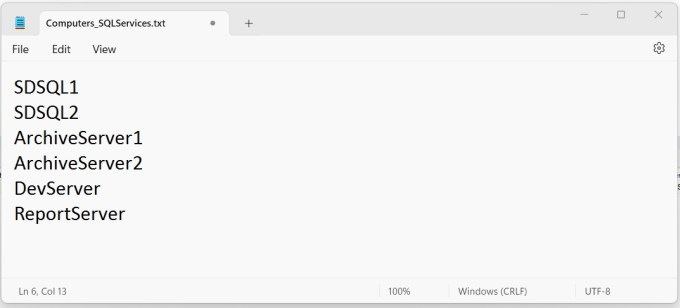
The following is your Powershell script, which must be stored with the “.ps1” extension.
clear
# read computers from text file
$computers = Get-Content D:\MonitorServices\Computers_SQLServices.txt;
$start = $true;$recipients = “shafi.shaik@domain.ae”
— if it is multiple recipients then add them in comma separated values as shown below.
— $recipients = “shafi.shaik@domain.ae, shafi.dxb@domain.com”# Specify the Service array with the service names to be checked.
$serviceArray = ‘SQLSERVERAGENT’, ‘MSSQLSERVER’,’MSSQL$OPSDB’, ‘SQLAgent$OPSDB’, ‘MSSQL$SRS’, ‘SQLAgent$SRS’,’ReportServer’,’SQLcomplianceAgent’, ‘SQLcomplianceCollectionService’, ‘SQLdmCollectionService$Default’, ‘SQLdmManagementService$Default’,’MSSQL$NUCLEUS’;# Configure mail server
$PSEmailServer = ‘excg01.dubai.local’# Loop statement to fetch the computers list and check the services from each instance.
foreach($computer in $computers)
{
If (Test-Connection -ComputerName $computer -Count 1 -Quiet)
{
Write-Host “Checking $computer”;
$objWMIService = Get-WmiObject -Class win32_service -computer $computerforeach($service in $objWMIService)
{
# Check each service specicfied in the $serviceArray
foreach($srv in $serviceArray)
{
if($service.name -eq $srv)
{
#Write-Host “$srv is present on $computer.”;
if($service.state -eq “running”)
{
Write-Host “$srv is running on $computer”;
}
else
{
# To avoid checking for services that do not exist on those systems, do the following. This may be necessary if one of your instances has SQL Server Expression Edition or if the third-party tools are not installed. For example, I have a ‘named instance’ in DevServer, Expression Edition in SDSQL2 with no SQL Server Agent service and no ReportServer service in ArchiveServer1.
if (($srv -notmatch ‘^SQLSERVERAGENT$|^.*MSSQLSERVER$’ -and $computer -ne ‘DevServer’) -and ($srv -notmatch ‘^SQLSERVERAGENT$’ -and $computer -ne ‘SDSQL2’)
-and ($srv -notmatch ‘^ReportServer$’ -and $computer -ne ‘ArchiveServer1’))
{
$body = “$srv is not running on $computer”;
Send-MailMessage -From SQLServicesChecker@domain.ae -To $recipients -Subject “$srv is not running on $computer” -Body $body
}}
}
}
}} else {
Write-Host “$computer is offline”
$body = “The RPC server $computer is unavailable”;
Send-MailMessage -From shafi.shaik@domain.ae -To $recipients -Subject “$computer is not running” -Body $body
}
}
The script has been validated/tested and is fully functional. Please be mindful of the quotes before copying them.
 Big Data & SQL
Hello Shafi, I am getting lot of syntax errors. Have you tested script properly?. I’m not able to find attachment option here to attach my script. Please share your email, so i can share script with you
LikeLike
Hi Srinivas,
Send it to contact@bigdatansql.com
LikeLike
Error:
At C:\SWSetup\Services.ps1:10 char:37
+ $serviceArray = ‘SQLSERVERAGENT’, ‘MSSQLSERVER’,’MSSQL$OPSD …
+ ~
Missing argument in parameter list.
At C:\SWSetup\Services.ps1:31 char:22
+ if($service.state -eq “runningâ€)
+ ~
You must provide a value expression following the ‘-eq’ operator.
At C:\SWSetup\Services.ps1:31 char:23
+ if($service.state -eq “runningâ€)
+ ~~~~~~~~~~~~~
Unexpected token ‘“running‒ in expression or statement.
At C:\SWSetup\Services.ps1:31 char:23
+ if($service.state -eq “runningâ€)
+ ~~~~~~~~~~~~~
Missing closing ‘)’ after expression in ‘if’ statement.
At C:\SWSetup\Services.ps1:29 char:1
+ {
+ ~
Missing closing ‘}’ in statement block or type definition.
At C:\SWSetup\Services.ps1:27 char:1
+ {
+ ~
Missing closing ‘}’ in statement block or type definition.
At C:\SWSetup\Services.ps1:24 char:1
+ {
+ ~
Missing closing ‘}’ in statement block or type definition.
At C:\SWSetup\Services.ps1:19 char:1
+ {
+ ~
Missing closing ‘}’ in statement block or type definition.
At C:\SWSetup\Services.ps1:17 char:1
+ {
+ ~
Missing closing ‘}’ in statement block or type definition.
At C:\SWSetup\Services.ps1:31 char:36
+ if($service.state -eq “runningâ€)
+ ~
Unexpected token ‘)’ in expression or statement.
Not all parse errors were reported. Correct the reported errors and try again.
+ CategoryInfo : ParserError: (:) [], ParseException
+ FullyQualifiedErrorId : MissingArgument
LikeLike