
Please refer to my previous post, in which schema and data for EMP and DEPT tables available.
The topic of this post is SQL Server Analytical and Window Functions.
Analytic functions calculate an aggregate based on a group of rows. Unlike aggregate functions, however, analytic functions can return multiple rows for each group. Use analytic functions to compute moving averages, running totals, percentages, or top-N results within a group.
These functions are common in most RDBMS applications and widely used by data and business analysts.
NTILE:
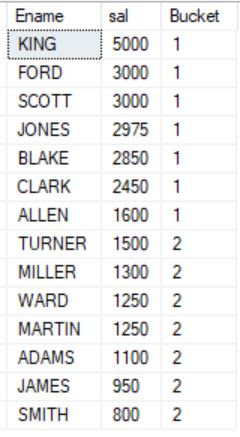
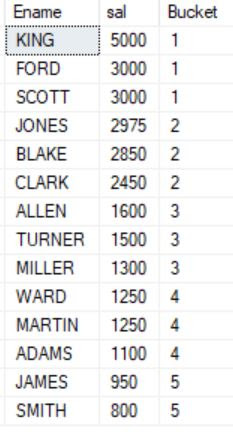
It divides/distributes an ordered data set (or partition) into a specified number of groups, which we call buckets, and assigns an appropriate (bucket) number to each row. The bucket number will represent each row to which bucket it belongs.
In other words, it is used to divide rows into equal sets and assign a number to each row.
SELECT Ename, sal, NTILE(2) OVER (ORDER BY sal DESC) Bucket FROM Emp;
SELECT Ename, sal, NTILE(5) OVER (ORDER BY sal DESC) Bucket FROM Emp;
SELECT * FROM (
SELECT Ename, sal, NTILE(4) OVER (ORDER BY sal DESC) Bucket FROM Emp) EmpAlias
WHERE Bucket=1;

ROW NUMBER:
This function represents each row with a unique and sequential value based on the column used in OVER clause.
Here, we have 10 rows in our Emp table and will use ROW_NUMBER on these records.
This can also be used to assign a serial or row number to the rows within the provided dataset.
SELECT DeptNo, sal, ROW_NUMBER() OVER (ORDER BY sal) AS row_num FROM emp;

SELECT DeptNo, sal,
ROW_NUMBER() OVER (PARTITION BY deptno ORDER BY sal DESC) AS row_num
FROM emp;

RANK:
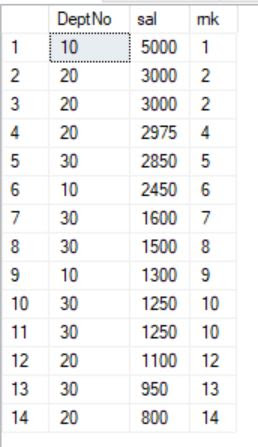
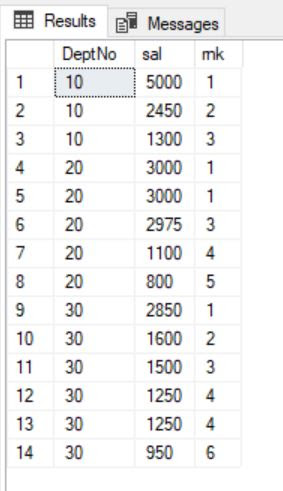
This function is used to assign a rank to the rows based on the column values in an OVER clause.
The row with equal values is assigned the same rank, with the next rank value skipped.
SELECT DeptNo, sal, RANK() OVER(ORDER BY sal DESC) AS rnk FROM emp;
SELECT DeptNo, sal, RANK() OVER(PARTITION BY DeptNo ORDER BY sal DESC) AS rnk
FROM emp;
DENSE_RANK:
The DENSE_RANK analytics function is used to assign a rank to each row. The rows with equal values receive the same rank and this rank is assigned in sequential order so that no rank values are skipped.
SELECT DeptNo, sal,
DENSE_RANK() OVER(PARTITION BY DeptNo ORDER BY sal DESC) AS dns_rnk FROM emp;

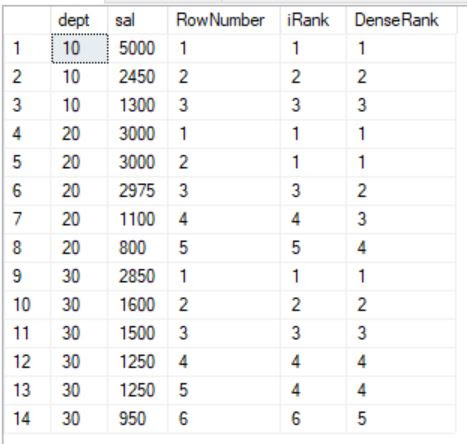
Let us use all the above functions in one query to see the difference in the results.
SELECT DeptNo AS dept, sal AS sal,
ROW_NUMBER() OVER (PARTITION BY DeptNo ORDER BY sal DESC) AS RowNumber,
RANK() OVER (PARTITION BY DeptNo ORDER BY sal DESC) AS iRank,
DENSE_RANK() OVER(PARTITION BY DeptNo ORDER BY sal DESC) AS DenseRank
FROM emp;
CUME_DIST:
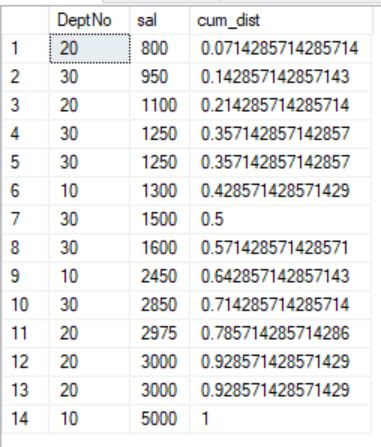
This function stands for cumulative distribution. It computes the relative position of a column value in a group. Here, we can calculate the cumulative distribution of salaries among all departments. For a row, the cumulative distribution of salary is calculated as follows:
SELECT DeptNo, sal, CUME_DIST() OVER (ORDER BY sal) AS cum_dist FROM emp;
SELECT DeptNo, sal, CUME_DIST() OVER (ORDER BY sal) AS cum_dist FROM emp
WHERE DEPTNO in(20,30);
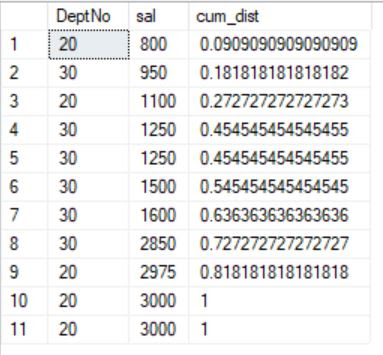
CUME_DIST(salary) = number of rows with a value lower than or equal to salary / total number of rows in the dataset.
In the first example, due to ORDER BY clause, the 1st row from salary is counted as 1, and it is then divided by the total number of rows. That means, 1/14 = 0.071
For the second row, it is 2/14 = 0.14;
The 4th row and the next immediate row have the same value, it will be calculated as 5/14 = 0.35, and the same has been assigned to both rows.
Look at the outcome to understand.
PERCENT_RANK:
It is very similar to the CUME_DIST function. It ranks the row as a percentage. In other words, it calculates the relative rank of a row within a group of rows.
The range of values returned by PERCENT_RANK is between 0 to 1. The first row in the dataset is always zero. This means the return value is of the double type.
Let’s rank the salary by department by percentage:
Percent_Rank = (rank decreased by 1)/(remaining rows in the group)
SELECT DeptNo, sal,
RANK() OVER (PARTITION BY deptNo ORDER BY sal DESC) AS iRank,
CUME_DIST() OVER (PARTITION BY deptno ORDER BY sal) AS cum_dist,
PERCENT_RANK() OVER (PARTITION BY deptNo ORDER BY sal) AS perc_rnk
FROM EMP;
Go

If you observe, when it calculates the relative rank for the rows with the same values, it assigns the same percentage rank value (0.75) to both of them. The behaviour is similar to that of the rank function.
Range Between & Rows Between:
These functions are called Windowing functions, which fetch records right before and after the current record to perform the aggregation. It is similar to lead and lag functions; however, a window function defines a frame or window of rows with a given length around the current row and performs a calculation across the set of data in the window. Mostly, these functions will be used to get the cumulative sum/average, running or moving sum or average.
SELECT DISTINCT DeptNo, SUM(sal) OVER(ORDER BY DeptNo RANGE BETWEEN UNBOUNDED PRECEDING AND CURRENT ROW) AS ‘RangeUnbound’
FROM emp
GO

SELECT DISTINCT DeptNo, SUM(sal) OVER(ORDER BY DeptNo
ROWS BETWEEN UNBOUNDED PRECEDING AND CURRENT ROW) AS ‘RowsUnbound’
FROM emp
GO

SELECT DISTINCT EMPNO, sal,
SUM(sal) OVER(ORDER BY EmpNo ROWS BETWEEN UNBOUNDED PRECEDING AND CURRENT ROW) AS ‘RowsUnbound’
FROM emp
GO

SELECT DISTINCT EMPNO, sal,
SUM(sal) OVER(ORDER BY EmpNo RANGE BETWEEN UNBOUNDED PRECEDING AND CURRENT ROW) AS ‘RangeUnbound’
FROM emp
GO

SELECT DISTINCT Job, sal, DeptNo,
SUM(sal) OVER(ORDER BY DeptNo RANGE BETWEEN UNBOUNDED PRECEDING AND CURRENT ROW) AS ‘RangeUnbound’
FROM emp
GO

LAG and LEAD:
The LAG function gets the information from a past column, while LEAD brings information from an ensuing line. The two functions are fundamentally the same as one another and you can simply supplant one by the other by changing the sort request.
SELECT ename, deptno, sal,
LEAD(sal, 1) OVER(PARTITION BY deptno ORDER BY sal) AS lead1,
LEAD(sal, 2) OVER(PARTITION BY deptno ORDER BY sal) AS lead2,
LAG(sal,1) OVER(PARTITION BY deptno ORDER BY sal) AS lag1,
LAG(sal,2) OVER(PARTITION BY deptno ORDER BY sal) AS lag2
FROM emp ORDER BY deptno,sal;

Happy learning!!!
 Big Data & SQL
Thank you so much Shafi! This has been very helpful & so easy to understand thanks to your detailed explanation.
LikeLike
I spend a lot of time writing blog posts and frequently forget to express gratitude to my followers. Your feedback is really valuable to me. Thanks a lot.
LikeLike