
This is the continuation part of “Sqoop Complete Tutorial”. If you want to read –
Part-1, please click here.
Part-2, please click here.
Part-3, please click here.
Part-4, please click here.
Part-5, please click here.
Part-6, please click here.
Part-7, please click here.
14) Read the contents of the database without importing it.
sqoop list-tables
–connect jdbc:mysql://localhost/empdept
–username root
–password cloudera
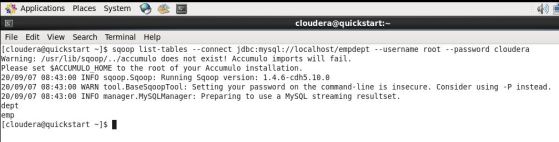
The above command will list out the tables from the given database.
15) Get the list of the databases using Sqoop
sqoop list-databases
–connect jdbc:mysql://localhost/
–username root
–password cloudera
 16) Import specific columns from a MySQL’s table to HDFS
sqoop list-databases
–connect jdbc:mysql://localhost/
–username root
–password cloudera
–table Emp
–columns “EmpNo, EName, DeptID”
The above command will help in importing only the columns that are specified. This is important, as most of the time, we do not need to import the complete data from a table.
17) Controlling the parallelism while import.
In the below example, we are trying to import the whole data as quickly as possible by defining the multiple processes. This can be achieved by assigning a larger number of mappers.
sqoop import
–connect jdbc:mysql://localhost/
–username root
–password cloudera
–table Emp
–m 8
With the above command, we completed learning how to import data from MySQL to HDFS using Sqoop. The upcoming articles are on how to import data from MySQL to Hive.
 Big Data & SQL
7 comments