
This is the continuation part of “Sqoop Complete Tutorial”. If you want to read –
Part-1, please click here.
Part-2, please click here.
Part-3, please click here.
Part-4, please click here.
Part-5, please click here.
Part-6, please click here.
Part-7, please click here.
18) Importing a table from MySQL to Hive’s default database.
Importing a table from MySQL to Hive’s default database. The below command will help in copying the “emp” table and data from MySQL to the Hive “default” database as “employee”.
sqoop import
–connect jdbc:mysql://localhost/empdept
–table emp
–username root
–password cloudera
–hive-import
–hive-table employees

Verifying the data:

19) Importing a table from MySQL to Hive’s user database.
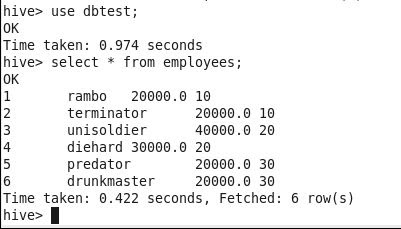
Importing a table from MySQL to Hive’s default database. The below command will help in copying the “emp” table and data from MySQL to Hive’s user database (dbTest) as the “employee” table.
sqoop import
–connect jdbc:mysql://localhost/empdept
–table emp
–username root
–password cloudera
–hive-import
–hive-table employees
–hive-database dbTest

Verifying the data:
Please click here for the next part.
 Big Data & SQL
6 comments