
This is the continuation part of “Sqoop Complete Tutorial”. If you want to read –
Part-1, please click here.
Part-2, please click here.
Part-3, please click here.
Part-4, please click here.
Part-5, please click here.
Part-6, please click here.
Part-7, please click here.
20) Importing all tables from MySQL to Hive
Importing a table from MySQL to Hive’s default database.
The below command will help in copying all the tables from MySQL to Hive user database.
sqoop import-all-tables
–connect jdbc:mysql://localhost/empdept
–username root
–password cloudera
–hive-import
–hive-database dbTest
It successfully imported the data from “emp” and “dept” tables from MySQL’s “empdata” database to Hive. However, if I look at the data, I see the records are duplicated.
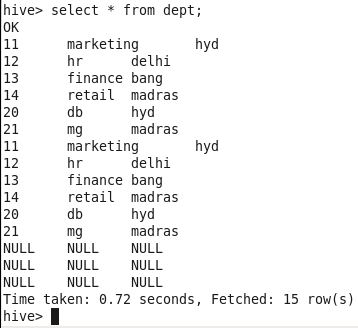
The reason for the duplication is that the tables “emp” and “dept” already exist in the database. “hive-overwrite” will help in replacing the data if it already exists.
sqoop import-all-tables
–connect jdbc:mysql://localhost/empdept
–username root
–password cloudera
–hive-import
–warehouse-dir /user/hive/warehouse/dbtest
–hive-database dbtest
–hive-overwrite
Here we have additionally provided the warehouse directory to specify the location of the database. After executing this script, the results are just fine.
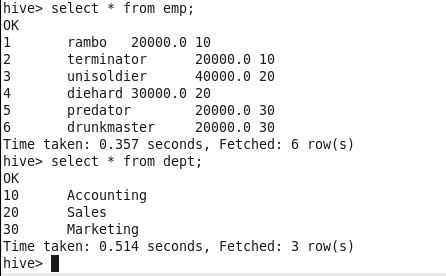
21) Importing all tables but excluding few from MySQL to Hive
I have created a table named “location” in my current database, ’empdept’ as shown below.
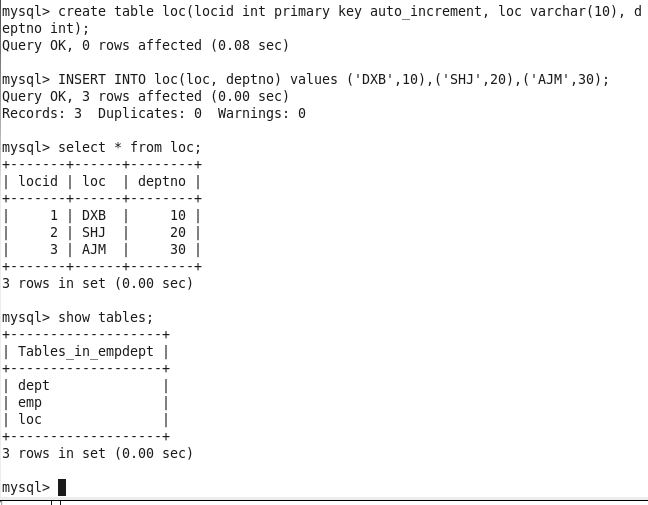
Since those were already imported, I am about to import all tables, excluding ’emp’ and ‘dept’. Since “location” is the only table to import, I can specify the table name, however, let’s see how it can be done with sqoop-import-all.
sqoop import-all-tables
–connect jdbc:mysql://localhost/empdept
–username root
–password cloudera
–hive-import
–hive-database dbtest
–exclude-tables “emp,dept”


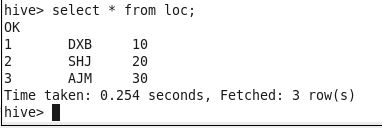
If you look at the above screenshots (click on the images to enlarge), the import process selects only the “loc” table and excludes the tables “emp” and “dept” from the import.
The data and table schema have been successfully imported into the Hive warehouse/database. Let’s check in Hive first.
 Big Data & SQL
6 comments